Every business network needs a gatekeeper, and that job usually comes down to two options: a hardware firewall sitting at the network’s edge, or software firewalls running on individual machines and servers. Most IT teams don’t pick one and walk away happy forever – they end up using both, just in different proportions depending on the size of the network and what’s actually being protected.
The confusion usually starts because vendors market these products as if they’re competing for the same job. They’re not, really. A hardware firewall protects everything behind it at once. A software firewall protects whatever it’s installed on. Once you understand that distinction, the rest of the decision gets a lot easier.
What a Hardware Firewall Actually Does
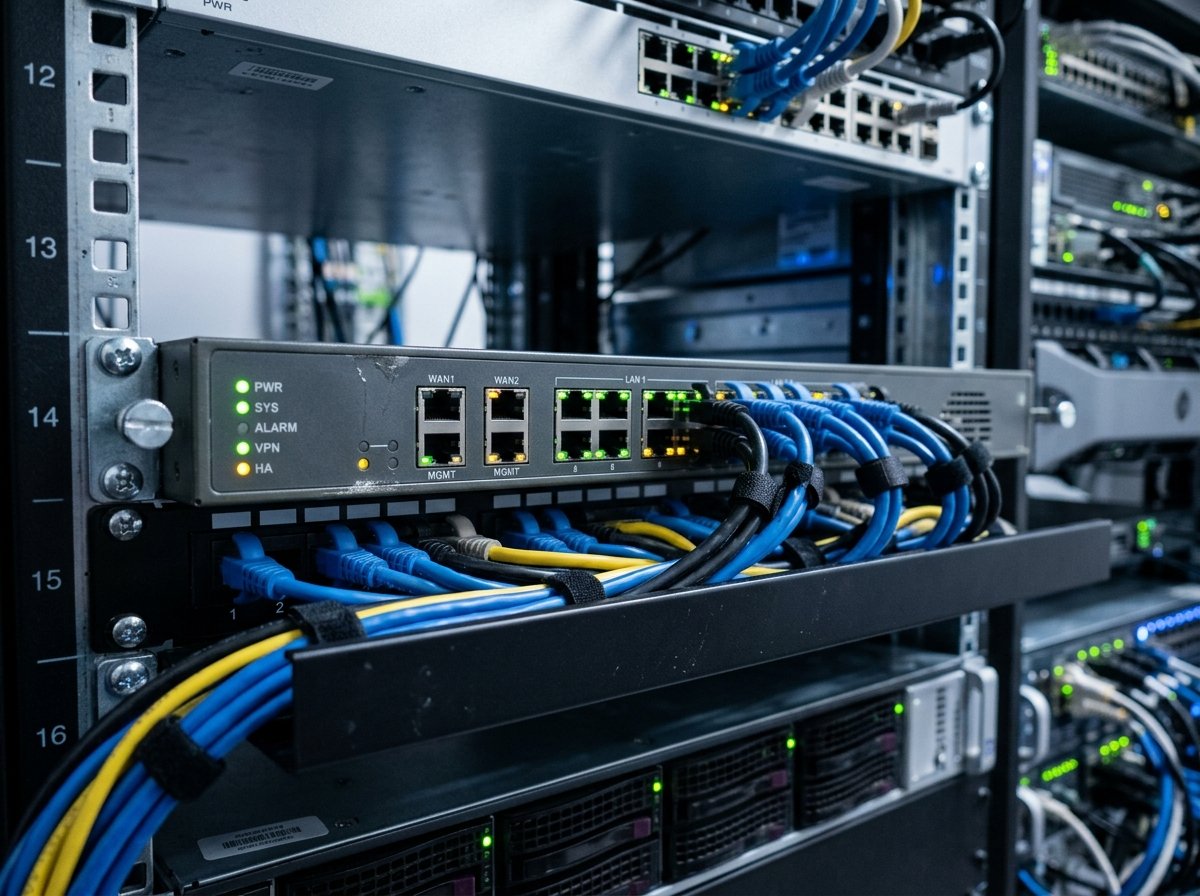
A hardware firewall is a physical appliance that sits between your internal network and the outside internet. Think of it as a checkpoint every packet of data has to pass through before it reaches any device on your network. Brands like Cisco, Fortinet, SonicWall, and Palo Alto Networks dominate this space, and for good reason – these devices are purpose-built with dedicated processors for handling encryption, deep packet inspection, and intrusion prevention without dragging down performance.
Because the hardware firewall sits outside your servers and workstations, it doesn’t consume any of their processing power. A 200-employee office running a Fortinet FortiGate appliance isn’t losing CPU cycles on firewall duties – that work happens entirely on the appliance itself. This matters more than people expect once you’re pushing serious traffic volume, especially with VPN tunnels or SSL inspection running in the background.
The tradeoff is upfront cost and a hardware footprint. You’re buying a physical box, it needs rack space, cooling, and someone has to manage firmware updates. If it fails, and hardware does fail eventually, you need a plan for that – either a spare unit, a high-availability pair, or a support contract with next-day replacement.
What a Software Firewall Does Differently
A software firewall runs as an application on the device it protects – your laptop, a specific server, a virtual machine. Windows Defender Firewall and built-in Linux tools like iptables or firewalld are the most common examples, though enterprise environments often layer on something more sophisticated like a host-based intrusion detection system.
The appeal here is granularity. A software firewall can make decisions based on which specific application is trying to send or receive traffic, not just which port or IP address is involved. That’s useful when you need to lock down a database server so only your application server can talk to it, even though both sit on the same internal network behind the same hardware firewall.
Software firewalls also travel with the device. A remote employee’s laptop with proper firewall software configured stays protected on hotel Wi-Fi or a coffee shop connection, somewhere a hardware firewall back at headquarters obviously can’t reach. That’s become a bigger deal since remote work stopped being a temporary arrangement for a lot of companies.
The downside is scale. Managing firewall policy across five hundred individual endpoints, each running its own software firewall, is a genuinely different problem than managing one appliance. Configuration drift creeps in. Someone disables a rule to troubleshoot something and forgets to turn it back on. Centralized management tools help, but they add their own licensing costs and complexity.
Hardware vs Software Firewall: Side-by-Side Comparison
| Factor | Hardware Firewall | Software Firewall |
|---|---|---|
| Deployment point | Network perimeter | Individual device |
| Performance impact on endpoints | None | Uses device CPU/RAM |
| Protects remote/mobile devices | No (unless VPN routes traffic through it) | Yes |
| Granularity | Network-wide rules | Per-application, per-process rules |
| Upfront cost | Higher (physical appliance) | Lower or often free |
| Scalability for large networks | Easier to manage centrally | Harder without endpoint management tools |
| Single point of failure risk | Yes, unless redundant | No, failures are isolated |
| Best suited for | Office networks, data centers, branch offices | Remote workers, servers needing app-level rules, layered defense |
Neither column wins outright. A lot of the decision comes down to what’s already sitting in your network and what you’re trying to close off.
Why Most Businesses End Up Using Both
Security professionals call this “defense in depth,” and it’s not just a buzzword – it reflects how attacks actually unfold. A hardware firewall stops the obvious stuff: port scans, known bad IP ranges, unencrypted traffic that shouldn’t be crossing the perimeter at all. But if an attacker gets past that layer, maybe through a phishing email that installs malware on an employee’s laptop, a software firewall on that machine is what stops the malware from freely scanning the rest of the network.
A mid-size accounting firm, for example, might run a Cisco ASA or FortiGate at the edge to handle VPN connections and general internet traffic filtering, while every workstation also runs endpoint protection software with its own firewall component locked down by IT policy. Neither layer is redundant. They’re catching different things.
Healthcare and financial companies tend to lean hardest into this layered approach because compliance frameworks like HIPAA and PCI-DSS more or less expect it. Auditors want to see network segmentation enforced at the hardware level and endpoint controls enforced at the software level, not one or the other.
When to Buy an Enterprise-Grade Firewall
If you’re at the point of shopping for an enterprise-grade hardware firewall, a few things matter more than brand loyalty. Throughput capacity should match your actual bandwidth, not just your current internet plan – if you’re planning to upgrade to gigabit fiber next year, buy for that now rather than replacing the appliance in twelve months. Look at what’s included versus what requires a subscription; a lot of vendors sell the box cheap, and charge annually for the threat intelligence feeds that make it useful.
High availability matters too, particularly for anything running production workloads. A firewall pair in active-passive configuration costs more than a single unit but avoids the scenario where one hardware failure takes your entire office offline. For companies that buy enterprise firewalls refurbished or in previous-generation models to save on cost, that’s a reasonable move as long as the vendor still supports firmware updates for that model – an unsupported firewall is arguably worse than no firewall, since it gives a false sense of protection.
Support responsiveness deserves more attention than it usually gets during procurement. A firewall going down at 2 AM on a Saturday is a different problem if your support contract guarantees a four-hour response versus next business day.
Making the Call for Your Network
Small businesses with a single office and modest traffic often do fine with one solid hardware firewall handling perimeter defense, paired with whatever software firewall comes built into their operating systems. There’s no need to overbuild security infrastructure for a ten-person office that isn’t handling sensitive data.
Larger organizations, anything with multiple locations, remote staff, or regulatory obligations, need both layers working together, and probably need centralized management software to keep the software firewall policies consistent across every endpoint. The hardware firewall handles the perimeter; software firewalls handle what happens once something’s already inside.
Frequently Asked Questions
Can a software firewall replace a hardware firewall entirely?
Not for a network with multiple devices. A software firewall only protects the device it’s installed on, so you’d need to configure and maintain one on every single machine with no centralized perimeter defense. It’s workable for a single laptop or home office setup, but it breaks down fast at any real scale.
Do I need a hardware firewall if I already use cloud-based security tools?
Often yes, though it depends on your setup. Cloud-based secure web gateways and SASE platforms can replace some traditional hardware firewall functions, but many businesses still run a physical appliance for on-premises traffic, VPN termination, and local network segmentation.
Are hardware firewalls worth it for a small business?
Usually, if you have more than a handful of employees or handle any sensitive customer data. A basic enterprise firewall from SonicWall or Fortinet’s entry-level line costs less than most businesses spend on coffee in a year, and the protection it adds is substantial compared to relying on a consumer router’s built-in filtering.
How often should enterprise firewalls be replaced?
Most vendors support hardware for five to seven years, though processing demands from things like SSL inspection can make older units feel sluggish sooner. Firmware and threat-definition updates matter more than the hardware’s raw age – a well-maintained five-year-old unit often outperforms a neglected newer one.